Multi-provider
OpenAI, Gemini, Ollama, LM Studio, and any OpenAI-compatible endpoint.

Test your LLM prompts on local data. Run it through multiple models at once. Compare outputs, check costs, export what works.
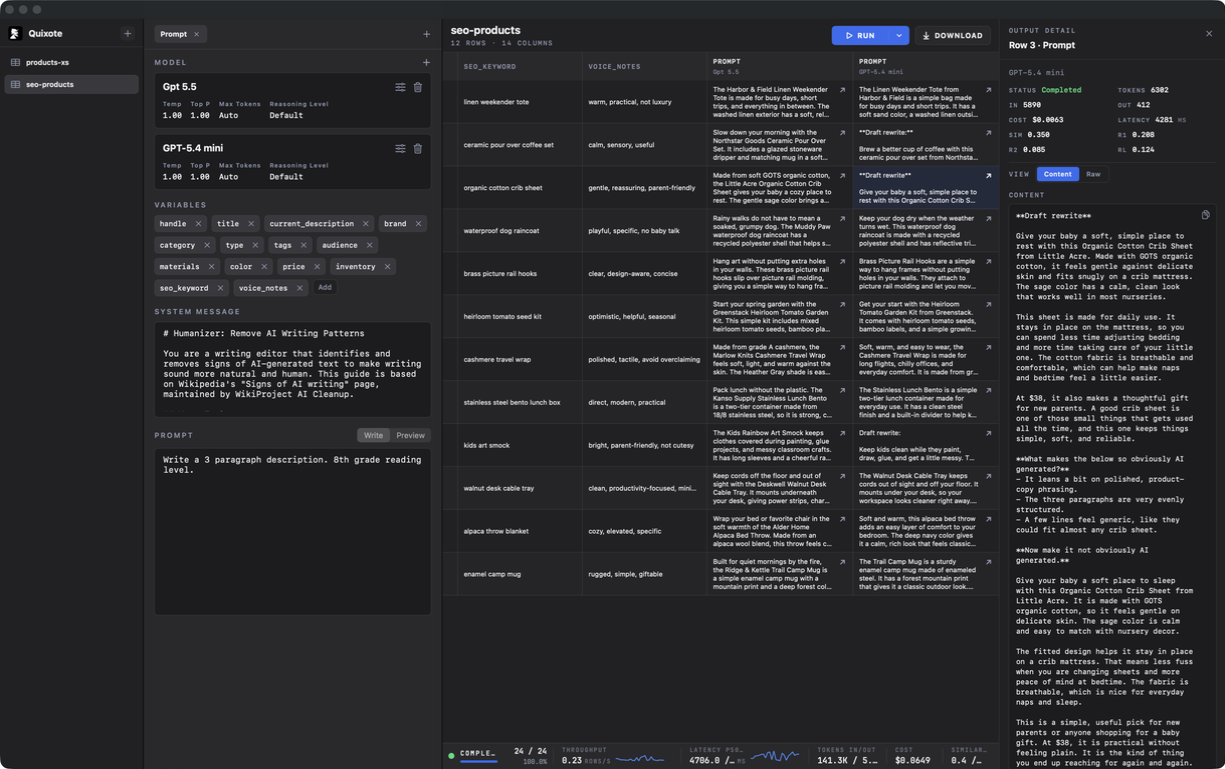
Load a local CSV, write prompts that reference any column, and run them through OpenAI, Gemini, Ollama, LM Studio, or a compatible API. The table, raw responses, token costs, and timing all stay in one window. Nothing leaves your machine.
Use hosted APIs, local model servers, or any OpenAI-compatible endpoint.
OpenAI, Gemini, Ollama, LM Studio, and any OpenAI-compatible endpoint.
Pull model lists from providers that expose /v1/models.
Add model IDs for local servers or gateways that cannot list models.
Run multiple models on the same rows and compare outputs, grader verdicts, cost, and latency column by column.
Open CSV, TSV, tab-delimited, JSON arrays, or Excel files.
Reference any column with {{column_name}} inside a prompt.
Attach multiple prompt tabs to one dataset — test variants without re-importing.
Download the completed table as CSV when the run finishes.
Compare different instructions against the same data.
Write a system prompt once; every row in the run uses it.
Tune temperature, top-p, max tokens, and reasoning level per model.
Test all rows or sample the first 10, 100, or 1000 rows.
Add reusable LLM-as-judge rubrics to any prompt without changing the prompt text.
Start with Factfulness, Completeness, Instruction Following, Relevance, Clarity, Conciseness, and Safety / Refusal Quality.
Edit the judge system message, rubric, categories, model, and execution mode.
See category badges next to each output and inspect stored reasoning when needed.
Compare average grader scores and category distributions by prompt, model, and grader.
Process multiple rows at once instead of waiting for each response in sequence.
Stop a run and continue later from the saved queue state.
Re-run only the outputs that errored.
Inspect and copy the model response behind any cell.
Track input and output tokens by run, row, and model.
See what each model is costing you, per row and in total.
Compare response time and throughput while a run is active.
Review similarity, ROUGE, and LLM-as-judge grader scores when references are available.